New York Virtual Court Hearings: What Has Changed?
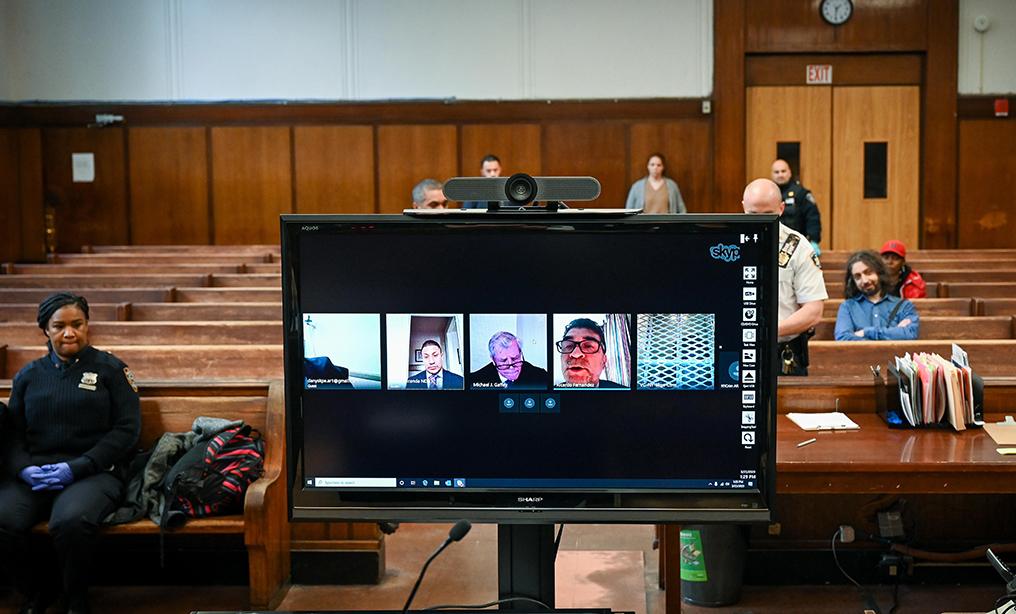
A few years ago, attending court usually meant getting up early, finding parking, going through courthouse security, and sitting around waiting for your case to be called. That picture has changed quite a bit. New York virtual court hearings are now part of the regular court experience in many types of cases, although they have not replaced in-person appearances across the board. The New York State Unified Court System continues to use virtual appearances through platforms such as Microsoft Teams, while some courts also use the New York Virtual Court Appearance Platform, or NY-VCAP.
The important part is that virtual does not automatically mean optional. Whether someone can appear remotely depends on the court, the type of proceeding, and the judge or applicable court rules.
Virtual Hearings Are No Longer Just a Pandemic Workaround
Remote hearings became much more common during the COVID-19 pandemic. New York’s court system began using video technology for essential proceedings and later expanded virtual appearances to other matters, including settlement conferences.
What has changed since then is that remote appearances have become an established part of court administration rather than something used only during an emergency.
You can see this in individual courts. For example, the Bronx County Supreme Court’s Civil Term states that conferences and motion appearances are held virtually as determined by the court, generally through Microsoft Teams.
At the same time, New York Courts specifically warns that not every case is heard virtually. Someone who simply assumes a hearing is online could easily miss an important appearance.
The Court Decides Whether Your Appearance Is Virtual
This is probably the biggest thing people need to understand.
Getting used to Zoom or Teams does not mean you can automatically choose to stay home for every court date. The court determines whether a particular appearance will be conducted remotely.
New York City’s Civil Court, for example, provides virtual courtroom links for civil, housing and small claims matters but specifically tells users to confirm with the clerk that their particular case is scheduled for a virtual appearance.
So if your notice says you have court on Tuesday, don’t assume that means “Tuesday on Teams.” Check the notice, eCourts information, court instructions, or contact the appropriate clerk.
That small step can save a very stressful morning.
Microsoft Teams Is Now Part of the Court Process
For many New York State virtual appearances, Microsoft Teams is the platform used to connect the judge, attorneys, parties and court staff. The court system provides instructions for joining these appearances, including testing your microphone and camera before the hearing.
This sounds simple, but technical problems can become a real issue when someone’s case is actually being called.
A person who joins five minutes late because they were trying to figure out the microphone may already have missed important instructions. It is much better to open the meeting early, check the connection and have the appearance information ready.
New York Also Has Its Own Virtual Court Platform
Another change people may not realize is that not every virtual court appearance necessarily uses Teams.
New York Courts has introduced NY-VCAP, a browser-based platform designed to let people attend certain court hearings without entering the courthouse. The court specifically notes that NY-VCAP is different from Microsoft Teams.
That means you should not rely on an old Teams invitation from a previous hearing. Always use the instructions connected to your current appearance.
Criminal Proceedings Have Seen Important Rule Changes
Virtual appearances have also moved into more formal rulemaking.
New York adopted a new rule regulating electronic appearances during criminal proceedings. The measure was adopted on November 17, 2025, and became effective January 5, 2026.
This is significant because it shows that electronic appearances are no longer simply an informal technology decision. The court system has been building formal rules around when and how electronic appearances can be used.
The exact requirements can depend on the proceeding, so defendants should not assume that every criminal court appearance can be handled remotely.
Family Court Has Its Own Considerations
Family Court can involve particularly sensitive matters, and electronic appearances have specific rules and pilot programs.
For example, New York’s Family Court rules address electronic appearances for certain temporary orders of protection proceedings. Participation in those pilot programs is voluntary for petitioners, and the rules include procedures concerning electronic documents, testimony, recording and preservation.
This is a good example of why “virtual court” is not one single statewide process. Different courts and different types of proceedings can have different requirements.
You Still Have to Treat a Virtual Hearing Like Real Court
One mistake people make is treating a virtual hearing like a casual video call.
It isn’t.
You still need to know your court date, understand why you are appearing, have relevant documents available and follow the judge’s instructions. Being at home does not make the proceeding less important.
There are also restrictions on recording. New York Courts states that people viewing a virtual proceeding are prohibited from recording video or audio or taking photographs or screenshots during the proceeding.
And if you are having trouble connecting, don’t simply disappear. Contact the court as soon as possible and follow its instructions.
What About People Who Do Not Have Good Technology?
Access remains an important issue. New York’s court system has developed resources intended to help people participate in virtual proceedings, including Virtual Court Access Navigator locations where court users may attend a scheduled virtual appearance and access other court resources.
That matters because moving part of the court process online only works if people can actually access it.
Someone with an unreliable internet connection, an old phone or no quiet place to participate may have a very different experience from someone sitting at a home office with high-speed internet.
What Should You Do Before a Virtual Hearing?
The safest approach is surprisingly simple: verify everything before the hearing date.
Check whether your appearance is actually virtual. Confirm the platform and meeting information. Test your microphone and camera. Charge your device. Find a quiet place where you can hear the court and be heard clearly. Keep your identification and relevant paperwork nearby.
And if you are represented by an attorney, follow the attorney’s instructions rather than assuming that a previous virtual appearance will work the same way.
FAQs
1. Are all New York court hearings virtual now?
No. New York uses both virtual and in-person appearances. Whether your case will be heard remotely depends on the court, the type of proceeding and the specific instructions for your case.
2. What platform does New York Courts use for virtual hearings?
Microsoft Teams is used for many virtual appearances, but New York also has NY-VCAP for certain proceedings. Your court’s instructions should tell you which system to use.
3. Can I choose to attend court virtually?
Not necessarily. You generally should not assume that you can decide on your own to appear remotely. Contact the court if you want to request a virtual appearance.
4. Can I record a virtual New York court hearing?
No. New York Courts states that recording video or audio, as well as taking photographs or screenshots during a virtual proceeding, is prohibited.
Final Thoughts
New York’s court system has clearly moved toward a more flexible mix of in-person and electronic appearances. The major change is not that every courtroom has become virtual. It is that remote appearances are now a regular part of how many courts handle conferences, motions and other proceedings.
For anyone with a court date, the practical lesson is simple: don’t guess. Check whether your appearance is virtual, find out which platform the court is using and follow the court’s specific instructions. A five-minute check beforehand can be the difference between logging in calmly and scrambling when your case is already being called.